Services
Business automation services, from one workflow to one system you own
We connect the tools your team already pays for so the copy-paste stops, or we replace them with one system you own. Most teams start with a single workflow, and nothing we build is billed per seat.
Should you automate your tools or replace them?
Start with the smallest change that fixes the problem. Often that isn't a custom system.
Connect what you have
When your tools fit and only the hand-offs hurt, we wire them together in n8n, Zapier or Make. One workflow takes days to a couple of weeks.
Pick one source of truth first
When three tools disagree about who a client is, decide which one owns each kind of record before automating anything. It's cheaper than a rebuild and often enough.
Replace them with one system you own
When per-seat fees, spreadsheet workarounds and fragile automations cost more than they save, we move your CRM, projects, time and invoicing into one application you own.
Keep what works
If your team uses the CRM you have and the price is fair, keep it. Accounting and payments stay with the companies that do only that.
What we automate
A few things we've built.
Client onboarding in one step
A signed deal sends the welcome email, shares the documents, creates the project and Drive folders, and queues the commission.
Lead follow-up
A form submission lands in your CRM, pings the team in Slack and sends the person a reply.
Accounting sync
Two-way sync between your sales or ticketing tools and Xero or QuickBooks, so invoices, tax and commission agree without a monthly reconciliation.
API and CRM integrationsAutomated reports
The monthly numbers someone spends a day assembling come out of one database, on a schedule.
Client and member portals
Clients log in to see their work and send requests. Once you own the portal, the next login costs nothing.
Custom software developmentAI on your own data
Search across your files, meeting notes and records, plus AI tools that draft from them. AI automation has its own page.
AI systems and automation
Workflow automation with n8n, Zapier and Make
When the hand-offs between your tools are the problem, a workflow tool is the fastest fix.
We build in n8n, Zapier and Make, and pick the one that suits the job and what you already pay for. n8n can run on your own server, which keeps costs down when you'd otherwise pay per task at volume.
For Lexter, an n8n workflow parses pasted and scraped law-firm lists into structured records for their lawyer database.
Once a dozen workflows hold the business together, each change risks breaking another, and you pay per task to copy data that should live in one place. That's when one system starts to cost less.
We're based in Calgary and build n8n and Zapier automations for teams here and across Canada.
Custom CRM development
We build CRMs around how your organization works, then hand you the code and the data. You never pay per seat, so a new hire or a new client login doesn't raise the bill.
Contacts, companies and deals
One record for every person and organization, with the full history of your work together.
Projects, tasks and time
Boards and timesheets tied to the client they belong to, so hours and budgets sit in the same place.
Invoicing with accounting sync
Invoices built from the work and synced with Xero or QuickBooks.
Donors, members and volunteers
For nonprofits: every gift, membership and conversation on one record, with recurring giving, tax receipts and consent.
Migration from your current tools
We bring records out of HubSpot, Airtable, Salesforce or spreadsheets and clean up duplicates. You keep the old system until the new one has been checked against it.
Our own system
Our own business runs on one system: CRM, projects, time tracking, client portals, invoicing and reporting. Xero and Slack stayed.
11
SaaS tools replaced, including HubSpot, Monday, Airtable, Harvest and Zapier
~$40
a month to run, down from low tens of thousands a year in subscriptions
24
scheduled automations doing work someone used to do by hand
0
per-seat fees, at any headcount
Systems we've built for clients
Most are internal tools our clients keep private. These three are public.

MODERNSPEAK
A creator agency's whole operation on one system, with batch invoicing, a creator portal and two-way Xero sync
Read the case study
SocialNext
About 16 hours of admin saved per event, after moving hundreds of thousands of records off Airtable
Read the case study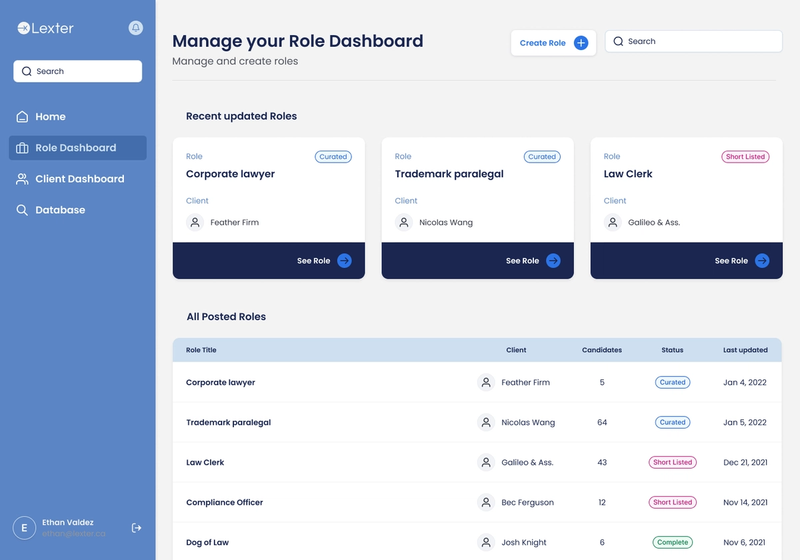
Lexter
An n8n workflow that turns law-firm lists into structured lawyer records
Read the case study
How a build runs
Discovery
We map your tools, your data and the reports someone builds by hand, then tell you whether you need a workflow, a cleanup or a new system. Some teams model the process in Airtable and run on it for a few months before we build.
Fixed build cycles
Each cycle has a set scope and price and ends with something your team can use. We start from a foundation we've shipped several times, so a full system takes three to five months.
Data migration
Records come over with their history and with duplicates cleaned up. Both systems run side by side until the numbers match.
Handover or ongoing support
You own the code, the data and the hosting. Take it in-house with documentation, or keep us for updates and new automations, with 30 days' notice to stop.
What we won't build you
For most of your stack, off-the-shelf software is the better choice.
Accounting and tax
Xero stayed in our own stack. Your books belong in accounting software, and we connect to it.
Payments and email delivery
Companies that do only this solve it better. We integrate Stripe and your email provider instead of rebuilding them.
Regulated systems
Where a bug could expose customer data or break compliance, use a vendor whose whole job is getting that right.
A rebuild for a data problem
If your tools disagree about your data, fix the data first.
Operations leadership
Some teams also want someone to own how the business runs, set priorities and improve the systems every month.
Tools we connect
If you rely on one that isn't here, ask.
- Xero
- QuickBooks
- HubSpot
- Salesforce
- Airtable
- Slack
- Gmail
- Google Calendar
- Google Workspace
- Stripe
- Streak
- Documenso
- n8n
- Zapier
- Make
- Supabase
How much does business automation cost?
Most projects cost between $2,000 for a single automation and $40,000 for a full custom system, at a fixed price agreed after a short planning session. What we build then costs $25 to $100 a month to run, with no per-seat fees.
Scope
How many workflows, or how many parts of the business the system covers.
Integrations
Each system it connects to, especially accounting.
Data migration
How much data moves over and how much cleanup it needs.
Portal users
Whether clients or members log in, and how many.
For comparison, Cleveroad, a development firm that publishes its estimates, prices a small-to-medium custom CRM built the traditional way at $50,000 to $80,000. Registered nonprofits and charities get 10% off.
See all our pricingQuestions about business automation
Should we automate our tools or build a custom system?
Start by automating. If your tools fit your work and only the hand-offs hurt, a few n8n or Zapier workflows fix it for a few thousand dollars. Build a custom system when per-seat fees, spreadsheet workarounds and fragile automations together cost more than owning one application would. We'll tell you which you need on the first call.
How much does a custom CRM cost?
You get one fixed price after a short planning session, and it costs $25 to $100 a month to run. A focused CRM for contacts, deals and projects takes a few build cycles; one that also handles invoicing, portals and accounting sync takes more.
Do we own the code and the data?
Yes. The code, the database and the hosting accounts are yours from day one. If you stop working with us, we hand everything over with documentation.
What does it cost to run once it's built?
Hosting usually comes to $25 to $100 a month, whatever your headcount. Our own system, which replaced 11 tools, runs on about $40. Updates and new features are optional: some clients keep us on a monthly Plan, others call when they need something.
Is a custom system secure, and can our data stay in Canada?
Yes. We build on Supabase and Vercel, with role-based permissions and row-level security on every table. Where data has to stay in Canada, such as donor or health records, we host the database in a Canadian region.
Do you work in Zapier, n8n and Make?
Yes, all three. We pick based on the job and what you already pay for. n8n can run on your own server, which keeps per-task costs down at volume.
What happens if an API changes or the person who built it leaves?
Each integration lives in one place, so when an outside API changes, we fix one module. The code is documented and sits in your own repository, so another developer or your own team can pick it up.
Do you work with teams outside Calgary?
Yes. We're based in Calgary, and most of our systems clients work with us remotely from across Canada.
Bring us your stack
Tell us what you pay for, where your data lives and which report takes someone a day every month. We'll tell you whether it's a workflow, a cleanup or a new system.
Book a call