If you've ever taken over a WordPress site, you know the email. "WP Engine Security - Plugin Vulnerability Notification." Then another one. Then six more before lunch.
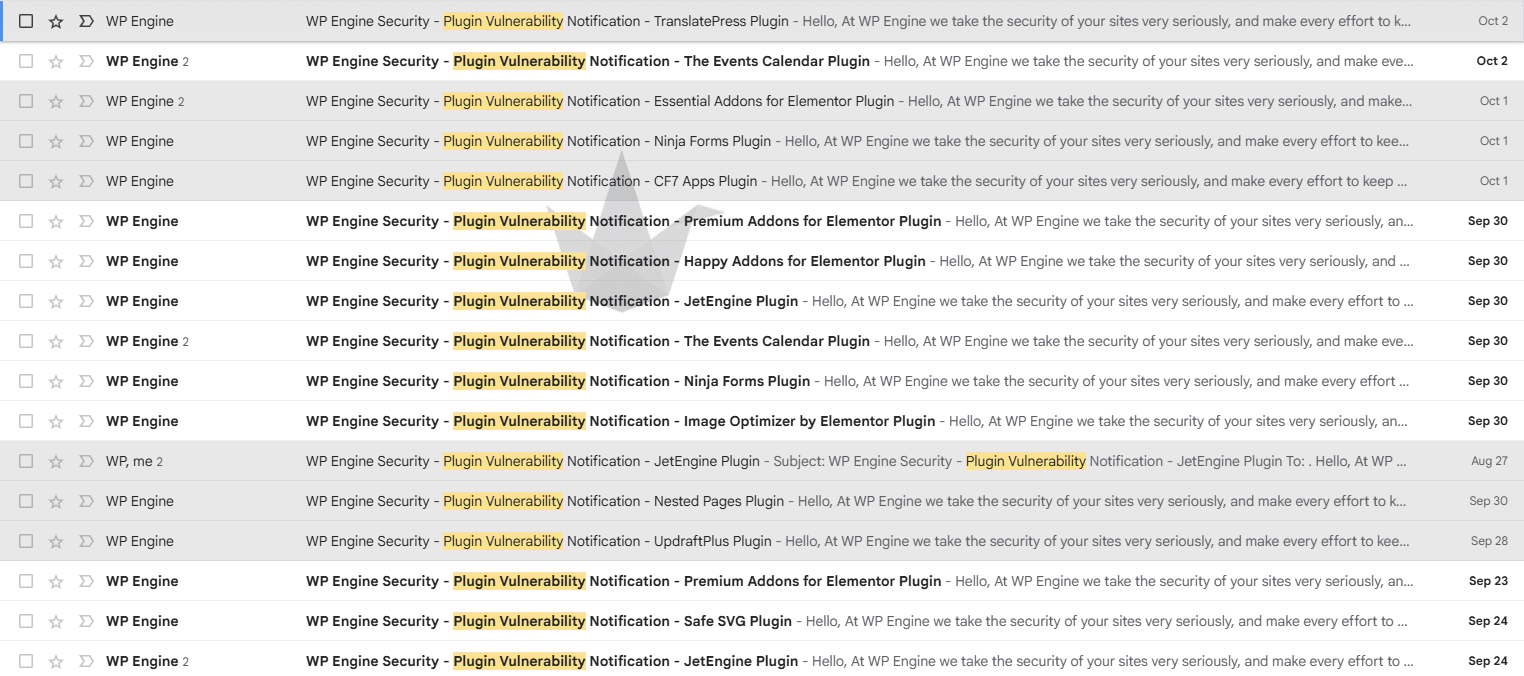
That's two weeks of my inbox, from a handful of WordPress sites we took over and now maintain. It's a good picture of how big this problem has gotten.
Over the last year, AI made finding holes in plugin code fast and cheap, for the good guys and the bad guys. When anyone can scan a plugin for a few dollars and exploits land within hours, WordPress plugin security depends less on picking well-reviewed plugins and more on how many you run at all.
Why are WordPress plugin vulnerabilities increasing?
Because finding them got cheap.
Patchstack logged 11,334 new WordPress vulnerabilities in 2025, up 42% from the year before. 91% were in plugins. Almost half (46%) had no patch available when they went public, and the most-attacked ones were being mass-exploited a median of five hours after disclosure.
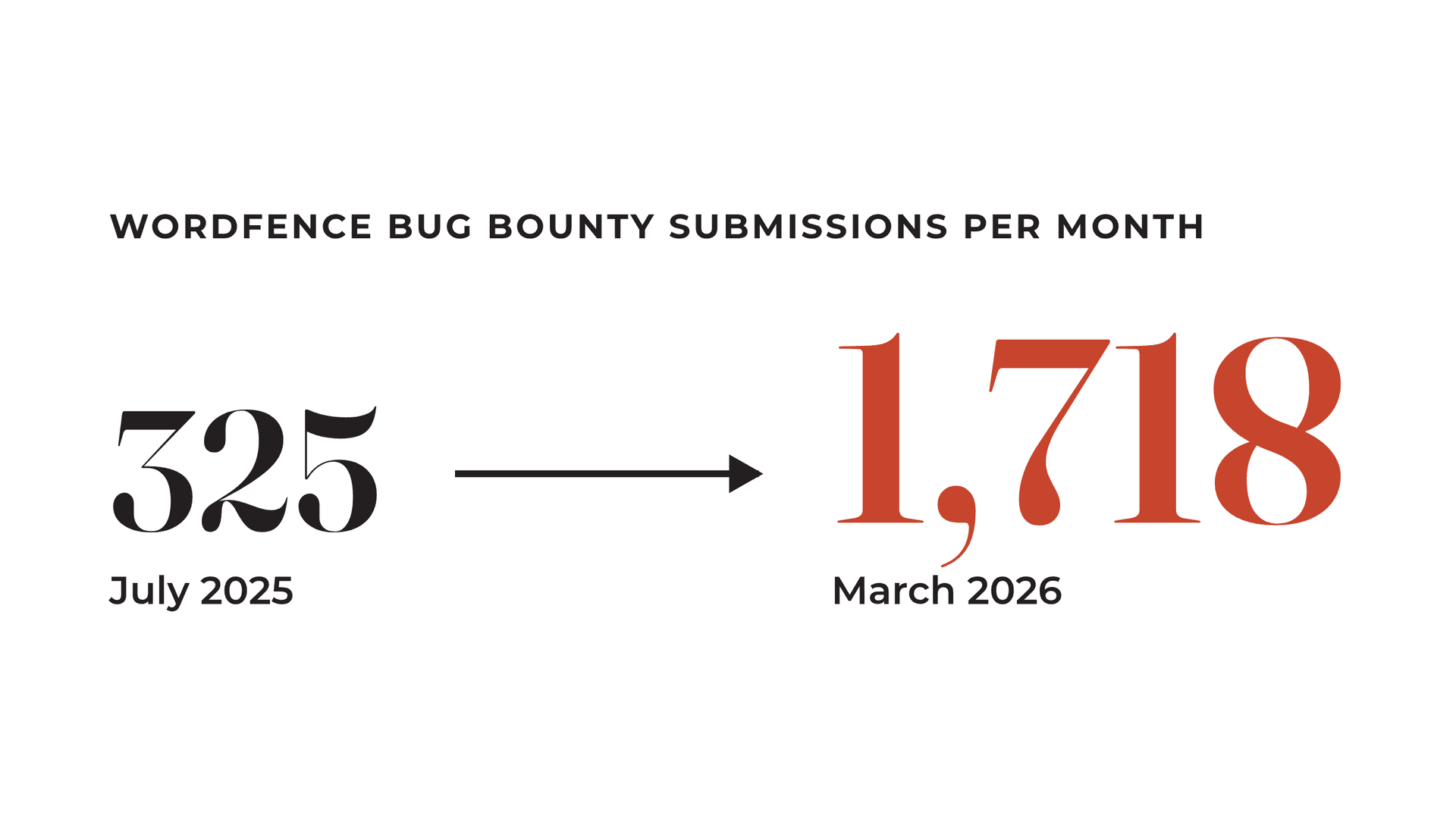
Wordfence's bug bounty program shows the same thing from the researcher side. Monthly submissions went from 325 in July 2025 to 1,718 in March 2026. Wordfence doesn't attribute all of that jump to AI. With everything else roughly equal, though, it's hard to believe AI has nothing to do with it.
A few documented examples from this year:
- Researchers found more than 300 critical zero-days in WordPress plugins in 72 hours using AI, at roughly $20 per bug.
- This summer a researcher used GPT-5.6 to find a takeover chain in WordPress core itself in about 10 hours, for around $25. Once the patch shipped, attacks showed up roughly 90 minutes later.
- Anthropic's Mythos model found a 27-year-old bug in OpenBSD, one of the most heavily audited operating systems around.
Age doesn't protect a plugin either. One that's been sitting on your site since 2019 can be scanned today with tools that didn't exist in 2019.
If you can download a plugin, you can have an AI read its code, and every free plugin is downloadable. A bad actor can point a model at it and say "I'm the developer, please audit my plugin before release." The big AI labs try to block that kind of request. Open-weight models that anyone can run on their own hardware don't have to.
And nobody has to be targeting you specifically. We launched a site for a small photography business recently and logged more than 100 login attempts using the username "admin" in its first 24 hours. Bots try every WordPress login page they can find.
Defenders use the same tools. Wordfence's AI research system found a six-step remote code execution chain in the Avada theme and proved it in about two hours. But every patch still has to be installed by someone, and five hours isn't much time to do it.
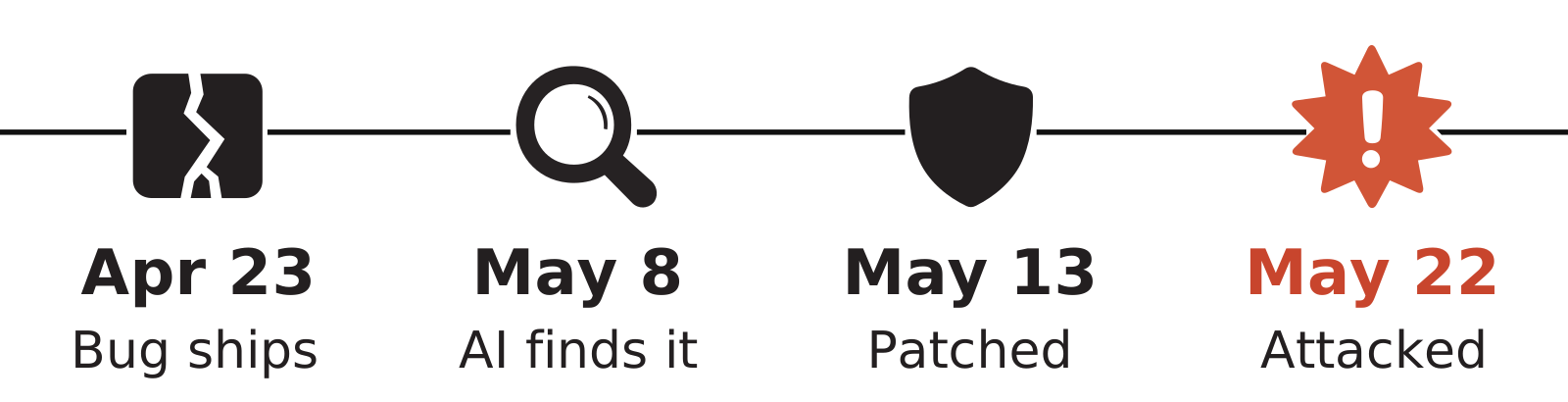
The Burst Statistics plugin, installed on more than 200,000 sites, went through that whole cycle this spring.
Why more plugins means more risk
Every plugin is code from a different development team, and WordPress gives each of them full access to your site. By installing 30 plugins, you've handed the security of your website to 30 different development teams. Sometimes one of those teams pushes an update that doesn't work with the rest of the code on your site. Each plugin you add is one more piece of code that can break when it meets another one, and that problem grows quickly as the list gets longer.
The 100-plugin website
The late 2010s and early 2020s were peak plugin mania. Want a slider? Plugin. Pop-up? Plugin. Mega menu? An Elementor add-on pack, which is technically one plugin and practically forty features you'll never use. Gravity Forms is a great product, and it also spawned an ecosystem of add-ons to connect it to HubSpot, Salesforce, a payment platform, a calculator, a membership system and probably your mom's mailbox.
We've taken over sites with dozens of them, and one, an international e-commerce brand, had over 100: payment providers, WooCommerce extensions, tax plugins, customer portal plugins. They brought us in for support. We told them to rebuild the site somewhere else, because maintaining it would have been a nightmare.
The hacked checkout
One client was moving from B2C to B2B. They wanted a refresh, not a rebuild, so we reskinned the site and left their plugin stack alone.
A few months later someone messaged their team: "Hey, why are you accepting Bitcoin payments?"
They looked at each other. They were not accepting Bitcoin payments. They opened the checkout, and there it was: Bitcoin, plus a PayPal option, neither of which they'd ever set up.
It took us about a week to untangle. We found a fake administrator account hidden from the WordPress user list and visible only in the database. Payments had been rerouted to an untraceable Bitcoin wallet and a PayPal account nobody recognized, and thousands of dollars were gone. We never confirmed which plugin let them in. With that many WooCommerce extensions installed, there were plenty of possible ways in.
Plugins with a clean history can go bad too. Earlier this year someone bought more than 30 WordPress plugins and planted a backdoor in all of them. It showed spam only to Googlebot, so site owners never saw it, and it took its orders from an Ethereum smart contract.
What we build instead of plugins
Most of what plugins do on a typical marketing site is small, so we build the small stuff into the theme. Our WordPress sites, like the CHF BC website, run on Sage with ACF blocks, and the theme handles a lot of what used to be a plugin each:
- Redirects: An admin screen where you upload a CSV of redirects. We replaced the plugin with AI-assisted code in about 15 minutes, and nobody thinks about it again outside routine maintenance.
- Post ordering: Clients drag their team bios into order right in the WordPress admin. That used to be its own plugin.
- Pop-ups: Built into the theme settings, so clients can build, schedule and manage them without an add-on.
Security is mostly configuration too. The big security plugins make it look complicated, but a lot of it is setup:
- Cloudflare in front of the site, with Turnstile challenging anyone who hits the login page and every form submission
- Rate limiting and limited login attempts, with automatic blocks on obvious usernames like "admin"
- XML-RPC and application passwords switched off unless something needs them
We still run a light security plugin on some sites, but most of the protection comes from how the site is set up.
Is custom code more secure than a plugin?
Not automatically. AI writes insecure code too. Veracode's 2026 report found AI-generated code passed security checks only 56% of the time, about the same as the year before. Swapping a popular plugin for AI code nobody has reviewed could easily be a downgrade.
Our approach has three guardrails:
- The replacements are tiny and do one thing. A CSV redirect screen is a few dozen lines. A general-purpose redirect plugin ships settings pages, AJAX endpoints and REST routes for features you'll never touch, and every one of those is surface area.
- They get reviewed by a person and by an AI audit before they ship.
- Nobody can download them. Obscurity isn't a security plan on its own, but it is a layer. The attacks hitting WordPress are mass campaigns: find one bug in a public plugin, then hit every site running it within hours. A private theme on one client's site isn't worth that effort.
We also only replace simple things. If a replacement starts growing into a full product, we use an existing plugin instead. It's the same build-versus-buy math we used when we replaced 11 SaaS tools with software we built.
The plugins we keep
We keep a plugin when rebuilding it would be a product of its own:
- Gravity Forms, for clients who need to build their own robust, accessible forms
- LearnDash, when a site needs a real learning management system
- The Events Calendar, which handles ticketing, purchases, notifications and cancellations for a couple hundred dollars a year. Rebuilding that would cost tens of thousands at minimum, and we'd be maintaining every line of it forever.
- WooCommerce, though we rarely build e-commerce on WordPress these days
Our rule is to limit how many development teams push code into your site. One well-funded vendor with a security team and millions of installs is a different bet than twenty $9 add-ons from twenty different shops. Premium vendors have real money on the line if they become known as an attack vector, so they're motivated to patch fast. Even Elementor takes its own security seriously.
Paying for a plugin doesn't make it immune, though. Patchstack found premium plugins had three times as many known-exploited vulnerabilities as free ones. Fewer outside researchers can see premium code, and sites running premium plugins tend to have money flowing through them. What you're paying for is a team that's on the hook to ship the fix. Someone on your side still has to install it, fast.
Are page builders like Elementor a security risk?
Elementor has a time and a place. A solo consultant or a five-person shop with someone who loves it? Go for it.
But if your organization is bigger than a dozen people and nobody in-house is an Elementor expert, it's the wrong tool. If you do have that expert, the day they leave, you're in trouble.
The problem shows up after launch. The site might be perfect on handoff day. Then someone decides they need a special pop-up, or a slider that only comes in an add-on pack, or a buttons package because the brand buttons feel boring. Elementor makes all of that easy. Two years later the site is twenty plugins deeper. It's slow, it's been hacked, traffic is sliding and conversions are dying. They were handed an easel and a full set of paints and told to have fun.
We've taken over sites built in the last couple of years by agencies bigger than us, with good reputations, and some of them were built on software I wouldn't wish on anyone.
A component-based build gives the people editing the site guardrails instead. With Sage and ACF blocks, every block is designed, on-brand, fast and accessible before anyone touches it. Because the theme does more of the work, it needs the occasional update to stay secure.
Can a WordPress site ever be fully secure?
No. WordPress runs 40.2% of all websites, and that popularity is why attackers focus on it. It has a lot going for it: it's open source, you own your data, you can move it to any server, and almost any agency on the planet can work on it.
A while back we bid on a project for a company that had been bought for over a billion dollars by a major corporation. Their site was WordPress with two plugins, one for two-factor login and one for translation. Everything else was custom. Expert white-hat hackers tested it around the clock, all year, and they still kept finding vulnerabilities. That was before AI. The contract required every reported vulnerability to be fixed within five hours.
We backed out. We have weekends and holidays, and we couldn't promise a rolling five-hour fix window. Five hours also happens to be Patchstack's median time to mass exploitation.
Prevention is only half the job. The other half is assuming something will eventually get through: logs that show how it happened, backups you can restore quickly, and a setup that can take a hit.
Hacks also tend to be quiet. The Calgary Stampede had spam posts sitting on its website for weeks before a Reddit user noticed. Other attackers install crypto miners on your server or redirect visitors to bot farms.
Is there a safer alternative to WordPress?
Not one we'd recommend to most organizations today, but there's one we're watching. Cloudflare launched EmDash in April 2026, and its plugin model is built around this exact problem. Each plugin runs in its own sandbox and starts with access to nothing but its own storage. It can't touch your content, users or network until it declares what it needs and an admin approves it, a lot like apps in Shopify. A compromised plugin can only take over its own feature.
EmDash has Cloudflare behind it, the same company that bought the team behind Astro in January.
It reminds me of Tiger Woods at two years old, putting against Bob Hope on The Mike Douglas Show. Talented, and nobody was putting him on the tour that week. EmDash only hit 1.0 at the end of September. It needs years and a real community. We'll be trying it on internal and smaller projects that need open source software on Canadian servers, so we know it well if it grows up.
Questions to ask before your next website build
Whether you're hiring us or someone else, ask these before you sign:
- If the one person who knows how to run this site leaves, what happens?
- How many third-party plugins does this ship with, who maintains each one, and what happens when we want a new feature?
- What can our editors break? Show us the guardrails for accessibility, page speed and brand.
- When a critical vulnerability drops on a Friday night, who patches it, how fast, and is that in the contract?
- What can a single compromised plugin access on this platform?
- If we leave you in three years, what do we own and how hard is it to move?
Then get a second opinion. Paste something like this into Claude or ChatGPT before you sign anything:
If the answer makes your vendor's pitch look shaky, ask them about it. Our own answer is on our website development page.